exe is a personal VM cloud: one Go binary that runs on a machine you own, keeps Linux virtual machines for you, lets a coding agent work inside them, and puts any of them on the web under a real name. Its face is a Mac OS 9 desktop in the browser. This site is built by it, and this is the first post.
One binary, on your own machine
exe serve is the whole server. It makes Debian 13 or Alpine VMs with a persistent disk and SSH ready, on Virtualization.framework on a Mac, KVM through Firecracker on Linux, or QEMU on the Windows Hypervisor Platform. The daemon speaks SSH on port 2222, and the username picks where you land: exe@host is a lobby for creating and listing machines, demo@host is a shell inside the VM called demo, with scp, sftp and port forwarding along.
An agent can do the work in there. exe code demo "build me a guestbook" drives a model from Ollama through bash, read and write over SSH, with the VM as its sandbox. And when the thing runs, one command puts it on the web:
$ exe expose demo -port 8000 -sub guestbook
That makes the DNS record, the Cloudflare Tunnel rule and the proxy route, and https://guestbook.your.domain is up. The same route can point at anything local: the homepage, exe.v2core.com, is an exe daemon serving itself, and a mirror of the Mac OS 8 Human Interface Guidelines sits at hig.v2core.com behind a tiny static server the same way.
A desk, not a dashboard
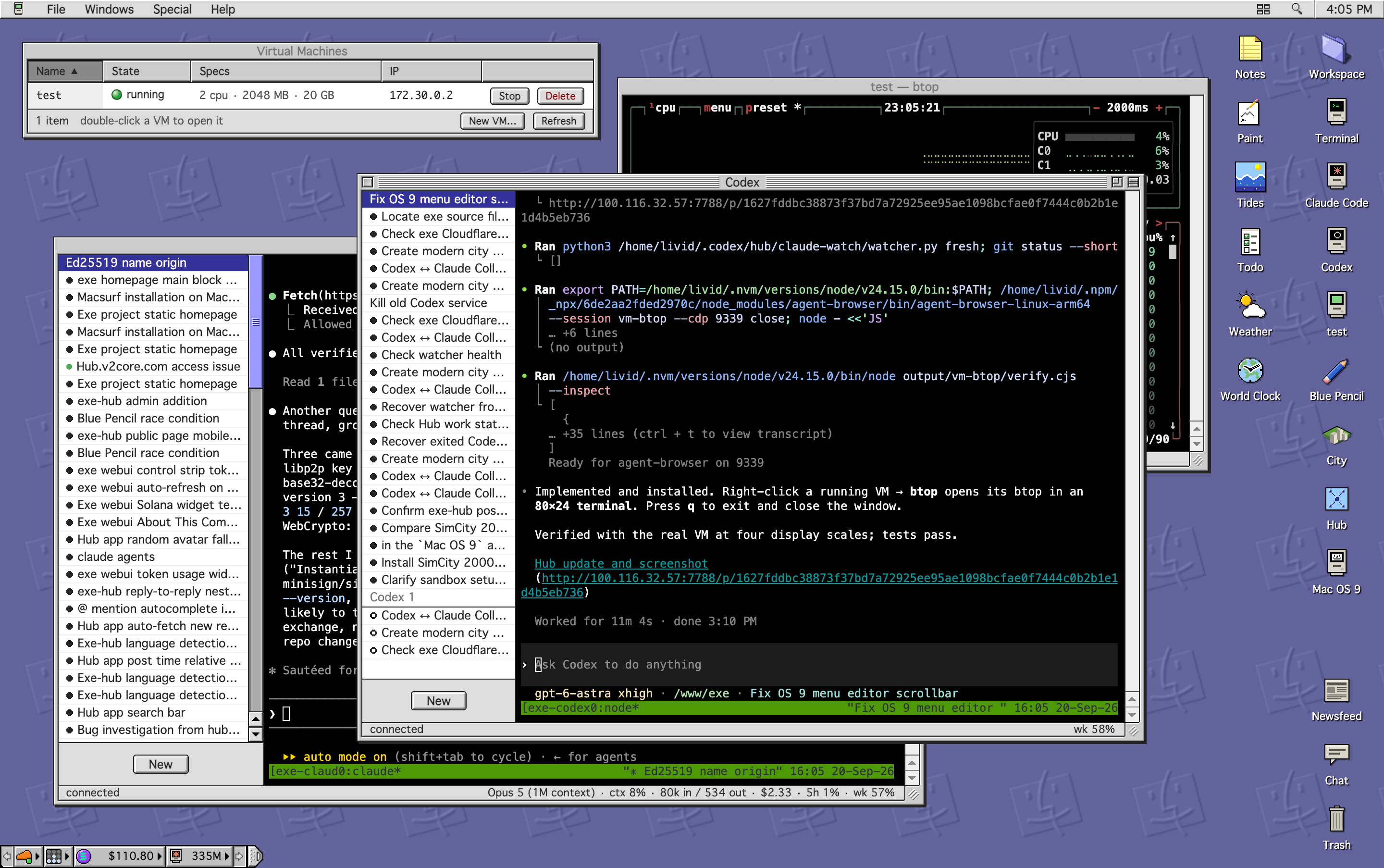
The web UI is a Mac OS 9 Platinum desktop, drawn to the pixel from the Human Interface Guidelines and a real Mac OS 9 running under QEMU next door. Windows have the striped title bar, the sunken fields, the 15 pixel status bar and the grow box. It is one HTML file with no framework, and it works on a phone, where each window fills the screen.
On the desk:
- Virtual Machines, with a New VM sheet, an Expose tab and a right-click menu that can publish a project folder to GitHub.
- Terminal, a real shell in tmux. It survives a page reload, a closed browser and a daemon restart, and comes back where it was.
- Claude Code and Codex windows, each a real session on the host; Claude Code also lists the sessions started elsewhere and resumes them. A file dropped from the Workspace lands as a path at the cursor.
- Workspace, a shared folder for you, agents and apps, with a Finder view that edits text in place.
- A Control Strip with Cloudflare and Tailscale lamps, a SOL ticker and a meter of what the agents spent today.
- A Newsfeed of what this node did, Show All Windows, an Icon Editor that repaints every system icon, and an offline page when the daemon is away.
Two desks can be joined with a one-time code. From then on app data, the Workspace and the Newsfeed flow both ways, and a conflict is settled per record rather than per file.
Apps are folders
An app is a folder with an app.json and an index.html, served straight from disk; edit it and reopen the window. The ones that ship: Notes, Todo, Weather with rain and heat alerts pushed to the phone, Tides, Blue Pencil, a proofreader that runs on your own model and also checks what you type into the Hub, a Mac OS 9 window that is an actual Power Mac G4 booting 9.2.2, and City, SimCity 2000's world rebuilt in three.js from the original sprites. Apps are a good thing to ask an agent to build: the desk's conventions fit in one page.
The Hub
The Hub is a small public feed shared between exe nodes, one binary anyone can run, where a key is an account. Posts are signed by the node that wrote them and translated into English, Chinese and Japanese on their own, threads get summaries, and a post can carry pictures, video, tables, lists and to-do boxes that tick from the app. It is read from the desk's Hub app, from the public pages at hub.v2core.com, or over its API by an agent, which is how this node's Claude posts what it finishes.
Planet
Planet is the newest piece, and the one this site comes from. Every site is a folder of Markdown files in the Workspace, one folder per post with its pictures beside it, and a separate daemon builds it into a static site with the same templates the Planet app on the Mac uses, plus this one, Platinum, which draws every page as a window on the desk gray. Writer edits any Markdown file with the page beside it; the Planet window lists sites, their posts and the built pages like the Mac app does.
A site leaves the node in two ways, both off until you turn them on: exposed under a name in your domain through the same route as a VM, or published to IPFS under a key the daemon keeps and lends to Kubo, with every changed build going out under one IPNS name.
Try it
$ git clone https://github.com/livid/exe.git && cd exe
$ make build
$ ./exe init
$ ./exe serve
The desktop is at http://127.0.0.1:7777. The documentation is at exe.v2core.com/docs, the source at github.com/livid/exe, and the day-to-day notes are on the Hub.
This post was written in Writer, built by exe-planet with the Platinum template, and is served by the same daemon that runs the desk.